
- Overview
- Create Asset Profile
- Asset Profile settings
- Asset profile details
- Related guides
- Your feedback
Overview
Since ThingsBoard 3.4.2, the Tenant administrator is able to configure common settings for multiple assets using Asset Profiles. Each Asset has one and only profile at a single point in time. Experienced ThingsBoard users can notice that the asset type has been deprecated in favor of the Asset Profile. The update script will automatically create Asset Profiles based on unique Asset Types and assign them to the appropriate assets.
Asset Profile allows you to select the Rule Chain and Queue to be used by the Rule Engine for processing of the asset data. Let’s take a look at the settings available in the asset profile.
Create Asset Profile
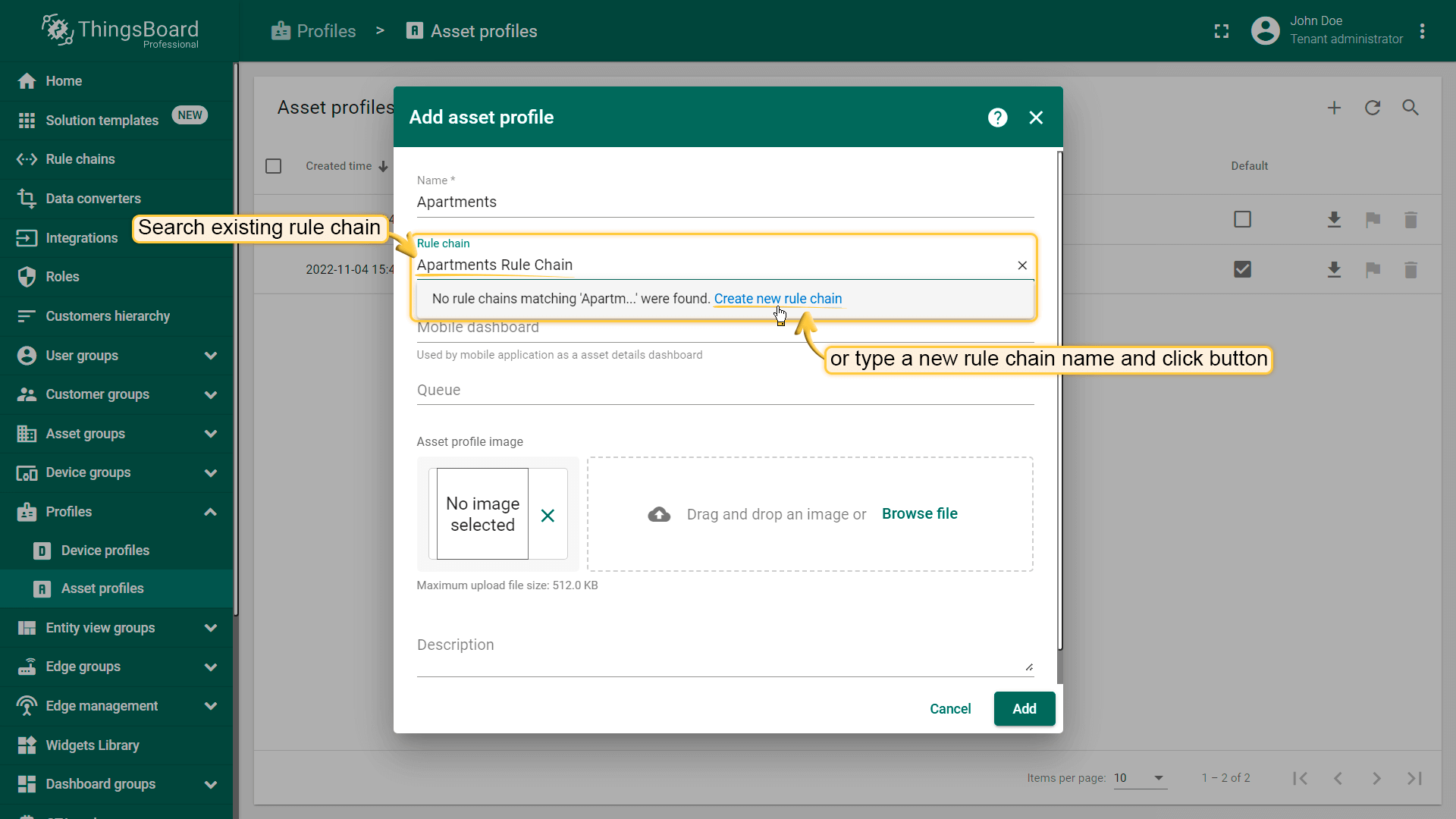
To create an asset profile, go to the Asset Profiles on the Profiles tab and click on the plus button to add a new asset profile.

Asset Profile settings
Rule Chain
By default, the Root Rule Chain processes all incoming messages and events for any asset. However, the more different asset types you have, the more complex your Root Rule Chain may become. Many platform users create their Root Rule Chain for the sole purpose of sending messages to specific rule chains depending on the asset type.
To avoid this painful and mundane activity, since ThingsBoard 3.4.2, you can specify a custom Rule Chain for your assets. The new Rule Chain will receive asset attributes updates, and asset lifecycle(Created/Updated/Deleted) events. This setting is available in the Asset Profile details.

Queue
By default, the Main queue will be used to store all incoming events from any asset. The API layer will submit messages to this queue and Rule Engine will poll the queue for new messages. However, for multiple use cases, you might want to use different queues for different assets. For example, you might want to isolate data processing for urgent asset data and other assets or devices. This way, even if your system has a peak load produced by millions of water meters, whenever the important asset configuration changes will be processed without delay. Separation of the queues also allows you to customize different submit and processing strategies.
This setting is available when you create an Asset Profile and in the Asset Profile details.


Asset profile details
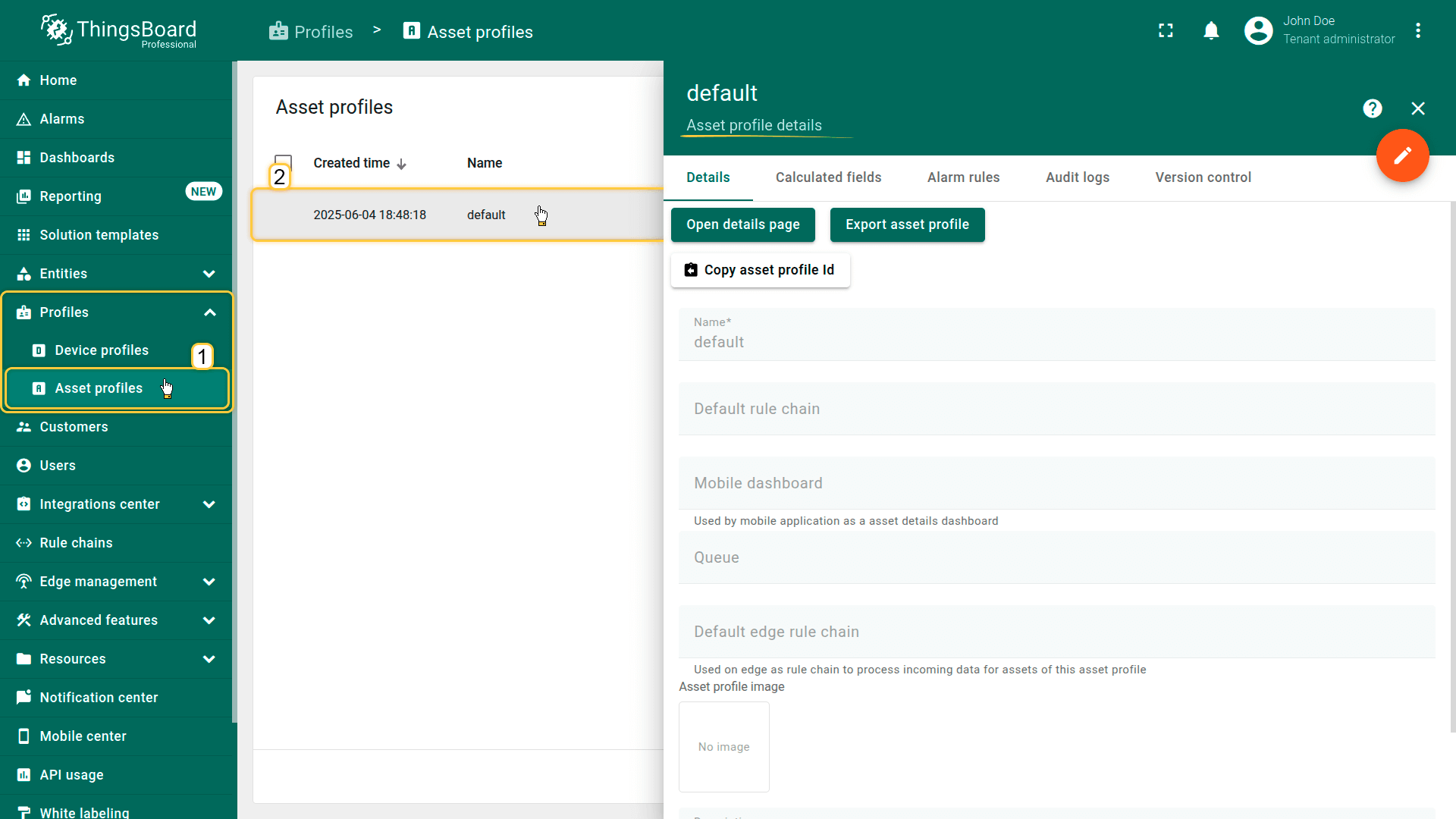
Clicking an asset profile opens a detailed view where you can access and manage all aspects of that profile.
Details
This tab contains the core configuration of the asset profile — general settings that define behavior and default parameters for all assets using this profile. Here you can configure the profile name, default dashboard, default rule chain, visual settings, and metadata that apply to all associated assets.
Calculated fields
Displays fields whose values are automatically computed using formulas based on asset attributes or telemetry. Calculated fields defined at the profile level are inherited by all assets using this profile, enabling consistent generation of derived metrics without modifying data sources.
Alarm rules
Contains alarm rules configured for the asset profile. These rules define:
- trigger conditions
- severity levels
- alarm creation and clearing logic
- propagation and optional automated actions
All assets assigned to this profile follow the same alarm logic, simplifying monitoring and management.
Audit log
Shows a list of all user actions related to this asset profile — configuration changes, rule updates, and other modifications. Useful for traceability, compliance, and reviewing history of changes at the profile level.
Version control
Provides Git-based versioning features for the asset profile. You can export, commit, and restore profile configurations, allowing structured change management, backups, and collaboration.
Related guides
You can use the following links to check out the related guides:
Your feedback
Don't hesitate to star ThingsBoard on github to help us spread the word. If you have any questions about this sample, please contact us.